Anthropic killed OAuth for third-party tools. If you were relying on OpenClaw or similar frameworks to orchestrate Claude, you're stuck. But the CLI subprocess pattern (spawning the official claude binary and letting it handle authentication) still works. It was never affected.
I've been running this pattern in production for nine months across VNX Orchestration. Not as a proof of concept. As the primary way I coordinate up to four Claude Code instances working in parallel on real projects: coding, content production, business operations.
This post is the technical tutorial. No marketing, no opinion pieces. Just the four invocation patterns from my codebase, the practical problems you'll hit, and enough code to build your own minimal orchestrator in an afternoon.
If you want the context on why this pattern matters, read part 1. If you want the framework landscape analysis, read part 2. This post assumes you've decided CLI subprocess is the right approach and you want to build.
Why CLI Subprocess Works
The claude CLI binary is an official Anthropic product. When you type claude in your terminal, the binary:
- Authenticates using your logged-in session (stored locally by the binary itself)
- Handles rate limiting internally
- Manages model routing (Opus, Sonnet, Haiku)
- Streams responses back to your terminal
Your orchestration layer doesn't need to touch any of this. You just spawn the binary, pipe in a prompt, and read the output. The binary is the integration point, not an API, not an SDK, not an OAuth token.
This is fundamentally different from the harness model that OpenClaw and similar tools used. I've called it routing versus orchestration. They captured OAuth tokens and proxied requests through them. When Anthropic revoked those tokens, the tools broke. CLI subprocess doesn't proxy anything. It launches the official product. There's nothing to revoke.
The formal audit of my entire codebase confirmed: zero OAuth tokens, zero API calls to api.anthropic.com, zero Anthropic SDK imports. Every interaction with Claude goes through subprocess.run() or tmux send-keys.
Pattern A: Interactive Terminal via tmux
Source: scripts/commands/start.sh:687
This is the oldest pattern in VNX and the one I started with nine months ago. It launches Claude in an interactive terminal session managed by tmux.
# Launch Claude in a named tmux pane
tmux send-keys -t "$T0" "claude --model $t0_model $t0_flags" C-m
How it works:
- tmux creates named sessions with panes (T0 for orchestrator, T1–T3 for workers)
send-keystypes the command into the pane as if a human typed it- Claude starts in interactive mode. It can ask questions, show diffs, request permissions
- The orchestrator monitors the pane's output by reading the tmux buffer
When to use this:
- When you need Claude's full interactive capabilities (file editing, permission prompts, multi-turn conversation)
- When you want to watch what's happening in real time
- When the task requires Claude to make decisions about tool use mid-execution
The complete startup sequence:
#!/bin/bash
# Simplified from VNX start.sh

SESSION="vnx-orchestration"
T0_MODEL="claude-opus-4-6"
T1_MODEL="claude-sonnet-4-6"

# Create session with 4 panes
tmux new-session -d -s "$SESSION" -n "orchestration"
tmux split-window -h -t "$SESSION:0"
tmux split-window -v -t "$SESSION:0.0"
tmux split-window -v -t "$SESSION:0.1"

# Name the panes
tmux select-pane -t "$SESSION:0.0" -T "T0-orchestrator"
tmux select-pane -t "$SESSION:0.1" -T "T1-worker"
tmux select-pane -t "$SESSION:0.2" -T "T2-worker"
tmux select-pane -t "$SESSION:0.3" -T "T3-worker"

# Launch Claude in each pane with role-specific configuration
tmux send-keys -t "$SESSION:0.0" "claude --model $T0_MODEL" C-m
tmux send-keys -t "$SESSION:0.1" "claude --model $T1_MODEL" C-m
tmux send-keys -t "$SESSION:0.2" "claude --model $T1_MODEL" C-m
tmux send-keys -t "$SESSION:0.3" "claude --model $T1_MODEL" C-m
Reading output from tmux:
# Capture the last N lines from a pane
tmux capture-pane -t "$SESSION:0.1" -p -S -50

# Wait for a specific string (e.g., Claude's prompt indicator)
wait_for_prompt() {
    local pane=$1
    local timeout=${2:-120}
    local start=$(date +%s)
    while true; do
        local output=$(tmux capture-pane -t "$pane" -p -S -5)
        if echo "$output" | grep -q "^>"; then
            return 0
        fi
        if (( $(date +%s) - start > timeout )); then
            return 1  # Timeout
        fi
        sleep 2
    done
}
Gotchas:
- tmux sessions can die, taking in-flight work with them. Save state externally (I use a local SQLite coordination database)
- Pane buffer has a size limit, long outputs get truncated. Increase with
tmux set-option -g history-limit 50000 send-keysdoesn't know if the command succeeded. You need to parse output or use exit codes- Multiple panes competing for system resources can cause Claude to slow down
- In ephemeral tmux-spawn mode (fresh windows per dispatch, not fixed panes): the instruction can arrive at the interactive prompt but never get submitted. I found this the hard way -- via
capture-pane-- when my first real task through the new lane sat idle because a readiness check still looked for a "Welcome to Claude" banner that Claude Code v2.1.159 no longer prints. That kind of bug only surfaces when you dogfood your own default lane
Pattern B: Headless Subprocess
Source: scripts/lib/headless_adapter.py:59–68
This is the production-grade pattern. No tmux, no terminal UI. Just a subprocess that takes a prompt and returns text.
import subprocess
from typing import Optional

def ask_claude(
    prompt: str,
    model: str = "claude-sonnet-4-6",
    output_format: str = "text",
    max_turns: int = 1
) -> Optional[str]:
    """Send a prompt to Claude via CLI subprocess. Returns response text."""
    cmd = [
        "claude",
        "--print",              # Non-interactive mode
        "--output-format", output_format,
        "--model", model,
        "--max-turns", str(max_turns),
    ]

    result = subprocess.run(
        cmd,
        input=prompt,
        capture_output=True,
        text=True,
        timeout=300  # 5 minute timeout
    )

    if result.returncode != 0:
        print(f"Claude error: {result.stderr}")
        return None

    return result.stdout.strip()
How it works:
--print(or-p) puts Claude in non-interactive mode. It reads stdin, processes the prompt, and writes the response to stdout. No terminal UI, no permission prompts--output-format textgives you plain text. Usejsonfor structured output--max-turns 1limits to a single response (no multi-turn). Increase for complex tasks where Claude needs to use toolscapture_output=Truecaptures both stdout and stderrtimeout=300kills the process if it hangs (adjust per task complexity)
When to use this:
- Batch processing (analyze 50 files, review 10 PRs)
- Quality gates (send code to Claude for review, parse the verdict)
- Any task where you don't need interactive conversation
- When you want deterministic, scriptable automation
Handling JSON output:
import json

def ask_claude_json(prompt: str, model: str = "claude-sonnet-4-6") -> dict:
    """Get structured JSON response from Claude."""
    result = subprocess.run(
        ["claude", "-p", "--output-format", "json", "--max-turns", "1"],
        input=prompt,
        capture_output=True,
        text=True,
        timeout=300
    )

    if result.returncode != 0:
        return {"error": result.stderr}

    try:
        return json.loads(result.stdout)
    except json.JSONDecodeError:
        return {"error": "Invalid JSON", "raw": result.stdout}
Real-time streaming:
You're not limited to waiting for the full response. Use --output-format stream-json with subprocess.Popen to get real-time NDJSON events: thinking blocks, tool calls, and results as they happen:
import subprocess
import json

def stream_claude(prompt: str, model: str = "claude-sonnet-4-6"):
    """Stream real-time events from Claude via CLI subprocess."""
    proc = subprocess.Popen(
        ["claude", "-p", "--output-format", "stream-json", "--model", model],
        stdin=subprocess.PIPE,
        stdout=subprocess.PIPE,
        text=True
    )
    proc.stdin.write(prompt)
    proc.stdin.close()

    for line in proc.stdout:
        if line.strip():
            event = json.loads(line)
            yield event  # {"type": "thinking", ...} or {"type": "tool_use", ...}

    proc.wait()
This is how I'm building the dashboard agent stream: subprocess stdout piped to Server-Sent Events in the browser. No SDK, no API keys. Just the CLI with stream-json output.
Gotchas:
-
--printmode doesn't have access to the same tools as interactive mode. File editing and bash execution may be restricted depending on Claude Code's permission settings -
By default, each subprocess invocation starts a fresh context. Use
--resume $session_idto continue a previous session (capture the session ID from--output-format jsonoutput). Without resume, design your prompts to be self-contained -
The
claudebinary has startup overhead (~2-3 seconds). For latency-sensitive workflows, keep processes warm via tmux (Pattern A) instead -
stderr can contain warnings that aren't errors. Always check returncode, not just stderr content
Pattern C: One-Shot Analysis
Source: scripts/conversation_analyzer.py:557
A specialized variant of Pattern B for structured analysis tasks. Send code or data, get back a JSON verdict.
def analyze_code(file_path: str, criteria: str) -> dict:
    """One-shot code analysis via Claude CLI."""
    with open(file_path) as f:
        code = f.read()

    prompt = f"""Analyze this code against the following criteria:

{criteria}

Respond in JSON format:
{{"verdict": "pass"|"fail", "issues": [...], "score": 0-100}}

Code:
{code}
    result = subprocess.run(
        ["claude", "-p", "--output-format", "json", "--max-turns", "1"],
        input=prompt,
        capture_output=True,
        text=True,
        timeout=120
    )

    if result.returncode != 0:
        return {"verdict": "error", "issues": [result.stderr], "score": 0}

    try:
        return json.loads(result.stdout)
    except json.JSONDecodeError:
        # Claude sometimes wraps JSON in markdown code blocks
        import re
        match = re.search(r'```json?\s*(.*?)\s*```', result.stdout, re.DOTALL)
        if match:
            return json.loads(match.group(1))
        return {"verdict": "error", "issues": ["Invalid JSON response"], "score": 0}
Production example: PR review gate
def review_pr(diff: str) -> dict:
    """Quality gate: review a PR diff before merge."""
    prompt = f"""Review this git diff. Check for:
1. Security issues (injection, exposed secrets, unsafe operations)
2. Logic errors (off-by-one, null handling, race conditions)
3. Style issues (naming, structure, dead code)

Respond in JSON:
{{"approve": true|false, "blocking": [...], "suggestions": [...], "summary": "..."}}

Diff:
{diff}
return ask_claude_json(prompt, model="claude-opus-4-6")When to use this:
- Code review automation
- Test analysis (is this PR adequately tested?)
- Content validation (does this blog meet quality criteria?)
- Any task where you need a structured verdict from Claude
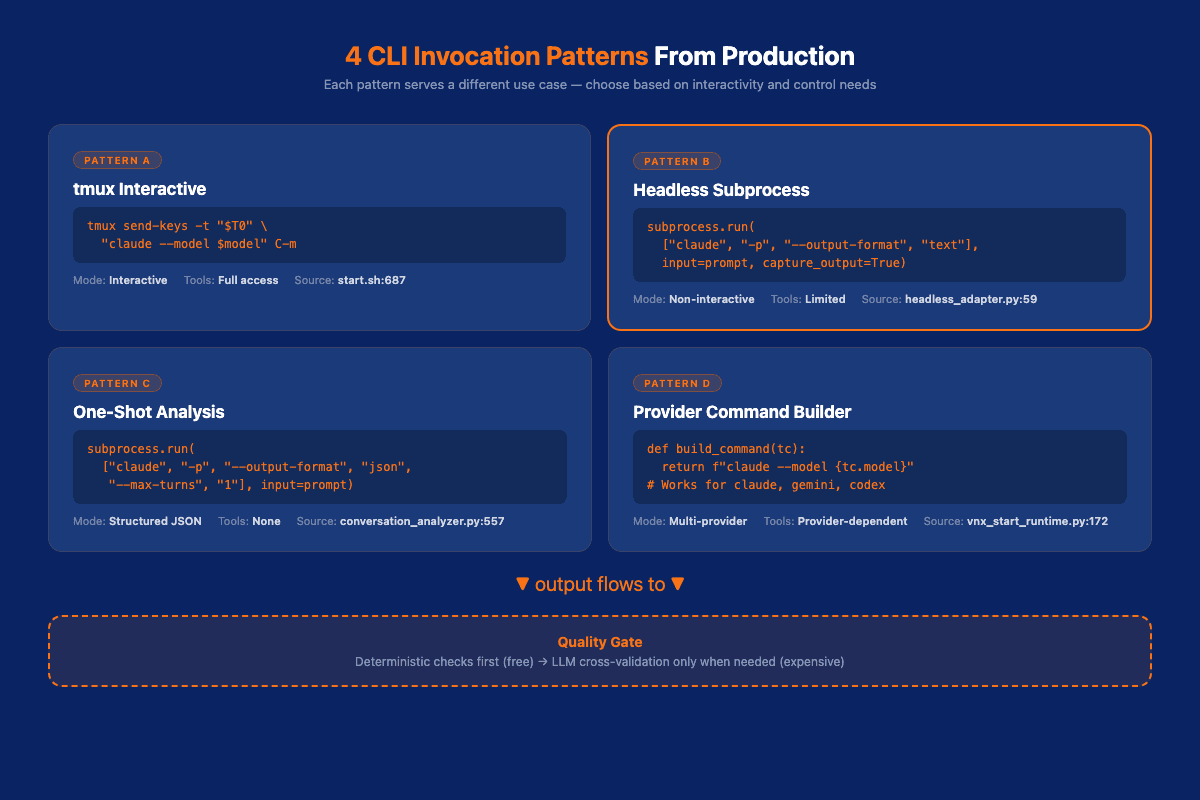
Pattern D: Provider Command Builder
Source: scripts/lib/vnx_start_runtime.py:148–172
This pattern abstracts the CLI invocation so you can swap providers without changing orchestration logic. VNX uses this to dispatch to Claude, Gemini CLI, or Codex. Same interface, different backends.
from dataclasses import dataclass
from typing import Optional

@dataclass
class TerminalConfig:
    model: str              # e.g., "claude-opus-4-6", "gemini-2.5-pro"
    provider: str           # "claude", "gemini", "codex"
    extra_flags: str = ""
    skip_permissions: bool = False

def build_command(tc: TerminalConfig) -> str:
    """Build the CLI command string for any supported provider."""
    if tc.provider == "claude":
        extra = f" {tc.extra_flags}" if tc.extra_flags else ""
        skip_flag = " --dangerously-skip-permissions" if tc.skip_permissions else ""
        return f"claude --model {tc.model}{extra}{skip_flag}"

    elif tc.provider == "gemini":
        return f"gemini --model {tc.model}"

    elif tc.provider == "codex":
        return f"codex --model {tc.model}"

    raise ValueError(f"Unknown provider: {tc.provider}")

# Usage
t0_config = TerminalConfig(
    model="claude-opus-4-6",
    provider="claude",
    skip_permissions=True  # Orchestrator runs autonomously
)

t1_config = TerminalConfig(
    model="claude-sonnet-4-6",
    provider="claude"
)

# Same dispatch interface for any provider
cmd_t0 = build_command(t0_config)  # "claude --model claude-opus-4-6 --dangerously-skip-permissions"
cmd_t1 = build_command(t1_config)  # "claude --model claude-sonnet-4-6"
Why this matters:
The day Anthropic changes the CLI flags, I update one function. The day I want to route a task to Gemini instead of Claude, I change the provider field. The orchestration logic (dispatching, monitoring, quality gates) doesn't know or care which LLM is running.
This is the same principle behind VNX's multi-provider headless architecture. The orchestrator dispatches to the best available model per task. Claude Opus for complex architecture decisions. Sonnet for code generation. Gemini for large-context analysis. Codex for independent code review.
📖 Read also: Why Architecture Beats Models: how system design decisions compound across 2,400+ dispatches
Building a Minimal Orchestrator
Here's a working orchestrator in ~100 lines. It dispatches tasks to multiple Claude instances in parallel, collects results, and runs a quality gate before accepting output.
#!/usr/bin/env python3
"""Minimal CLI subprocess orchestrator for Claude Code."""

import subprocess
import json
import concurrent.futures
from dataclasses import dataclass
from typing import List, Optional

@dataclass
class Task:
    id: str
    prompt: str
    model: str = "claude-sonnet-4-6"
    timeout: int = 300

@dataclass
class Result:
    task_id: str
    output: Optional[str]
    success: bool
    error: Optional[str] = None

def execute_task(task: Task) -> Result:
    """Execute a single task via Claude CLI subprocess."""
    try:
        proc = subprocess.run(
            ["claude", "-p", "--output-format", "text",
             "--model", task.model, "--max-turns", "3"],
            input=task.prompt,
            capture_output=True,
            text=True,
            timeout=task.timeout
        )

        if proc.returncode != 0:
            return Result(task.id, None, False, proc.stderr)

        return Result(task.id, proc.stdout.strip(), True)

    except subprocess.TimeoutExpired:
        return Result(task.id, None, False, "Timeout")

def quality_gate(result: Result) -> bool:
    """Deterministic quality check, no LLM needed."""
    if not result.success or not result.output:
        return False
    # Basic checks: not empty, not an error message, reasonable length
    if len(result.output) < 50:
        return False
    if "error" in result.output.lower()[:100]:
        return False
    return True

def dispatch(tasks: List[Task], max_workers: int = 3) -> List[Result]:
    """Dispatch tasks in parallel, apply quality gates."""
    results = []

    with concurrent.futures.ThreadPoolExecutor(max_workers=max_workers) as pool:
        futures = {pool.submit(execute_task, task): task for task in tasks}

        for future in concurrent.futures.as_completed(futures):
            task = futures[future]
            result = future.result()

            if quality_gate(result):
                print(f"[PASS] {task.id}")
                results.append(result)
            else:
                print(f"[FAIL] {task.id}: {result.error or 'Quality gate rejected'}")
                # Optionally retry with different model
                result.success = False
                results.append(result)

    return results

# Example usage
if __name__ == "__main__":
    tasks = [
        Task("review-auth", "Review this authentication module for security issues: ..."),
        Task("write-tests", "Write unit tests for the UserService class: ..."),
        Task("refactor-db", "Refactor this database query for performance: ...",
             model="claude-opus-4-6", timeout=600),
    ]

    results = dispatch(tasks)

    passed = [r for r in results if r.success]
    failed = [r for r in results if not r.success]
    print(f"\nResults: {len(passed)} passed, {len(failed)} failed")
This is intentionally minimal. Production systems need logging, retry logic, and state persistence. I use an append-only NDJSON receipt ledger to trace every dispatch back to its input and output. But the core pattern is here: dispatch via subprocess, validate via quality gate, collect results.
Adding Quality Gates
The minimal orchestrator above has a basic quality gate. In production, you want layered validation: deterministic checks first, LLM review only when needed.
Layer 1: Deterministic checks (free, instant)
def deterministic_gate(result: Result, task: Task) -> dict:
    """Checks that don't require an LLM."""
    issues = []

    output = result.output or ""

    # Length check
    if len(output) < 100:
        issues.append("Output suspiciously short")

    # Code-specific checks
    if "def " in task.prompt or "class " in task.prompt:
        if "TODO" in output or "FIXME" in output:
            issues.append("Contains TODO/FIXME markers")
        if "pass  # " in output:
            issues.append("Contains placeholder implementations")

    # Test-specific checks
    if "test" in task.id.lower():
        if "assert" not in output and "expect" not in output:
            issues.append("Test output contains no assertions")

    return {"pass": len(issues) == 0, "issues": issues}
Layer 2: Cross-validation (use a different model)
def cross_validate(output: str, original_prompt: str) -> dict:
    """Use a different model to review the first model's output."""
    review_prompt = f"""Review this output for correctness and completeness.

Original task: {original_prompt}

Output to review:
{output}

Respond in JSON: {{"approve": true|false, "issues": [...]}}"""

    # Use a different provider for independent review
    result = subprocess.run(
        ["claude", "-p", "--output-format", "json",
         "--model", "claude-opus-4-6", "--max-turns", "1"],
        input=review_prompt,
        capture_output=True, text=True, timeout=120
    )

    try:
        return json.loads(result.stdout)
    except (json.JSONDecodeError, AttributeError):
        return {"approve": False, "issues": ["Review parse error"]}
The key insight: deterministic gates unload your orchestrator's cognition. If a file size check or test count catches an obvious failure, you don't need to spend LLM tokens reviewing it. Save the expensive cross-validation for output that passes the cheap checks first.
The production version of this has now converged on a uniform dispatch lifecycle across all lanes. Every dispatch goes PREPARE (one instruction assembled from the skill body, a permission preamble, relevant intelligence, and a report-contract directive) to GOVERN (the worker authors a structured report, or the lane synthesizes one from git facts -- never a placeholder -- validated in shadow mode) to RECEIPT (an append-only, hash-chained NDJSON receipt is guaranteed; a lane-side fallback means no subscription session is ever silently lost). The quality gates sit between GOVERN and RECEIPT: the report passes deterministic checks first, cross-validation second, and only then does the receipt chain advance.
Context Rotation: When Sessions Get Stale
Long-running Claude sessions accumulate context. At some point, the model starts making worse decisions because its context window is cluttered with old information. I call this context rot.
VNX rotates context at 65% utilization. Here's the pattern:
def should_rotate(session_metrics: dict) -> bool:
    """Check if a session needs context rotation."""
    # Estimate context usage (approximate, Claude doesn't expose exact token count)
    estimated_tokens = session_metrics.get("total_chars", 0) / 4
    max_context = 200_000  # Claude's context window

    utilization = estimated_tokens / max_context
    return utilization > 0.65

def rotate_session(pane: str, handover_doc: str):
    """Rotate a tmux session with a handover document."""
    # Save current state
    current_output = capture_pane(pane, lines=100)

    # Create handover document with essential context
    handover = f"""Continue the following work. Here's what was accomplished and what remains:

{handover_doc}

Recent context (last 100 lines of output):
{current_output}
"""

    # Kill old session, start fresh
    tmux_send(pane, "exit")
    time.sleep(2)
    tmux_send(pane, f"claude --model {get_model(pane)}")
    time.sleep(3)

    # Feed handover document to new session
    tmux_send(pane, handover)
For headless subprocess (Pattern B), context rotation is simpler, each invocation starts fresh by design. The challenge is maintaining continuity between invocations. VNX solves this with a dispatch chain: each task's output becomes the next task's input context, but only the relevant parts get carried forward. The intelligence injection system feeds accumulated patterns and learnings into each fresh context, so agents start with institutional knowledge rather than a blank slate.
📖 Read also: The Real Cost of AI Agents in Production: full cost breakdown with real numbers from running this system
What Breaks and How to Fix It
Nine months of production use has taught me what fails. Here's the honest list.
1. tmux session death
tmux sessions can crash or disconnect. Any in-flight work is lost.
Fix: Checkpoint state to a local database after every significant output. On session recovery, restore from the last checkpoint. Better yet: migrate to Pattern B (headless subprocess) where sessions don't exist.
2. Subprocess timeouts
Complex tasks can exceed your timeout. The process gets killed, you get no output.
Fix: Set generous timeouts for complex tasks (10+ minutes for Opus architecture reviews). Log partial output via subprocess.Popen with real-time output capture instead of subprocess.run when you need visibility into long-running tasks.
3. Claude CLI format changes
Anthropic updates the CLI. Flags change. Output format changes. Your parsing breaks.
Fix: Wrap all CLI interaction in a single adapter module (Pattern D). When flags change, you update one file. Pin to a known-good Claude Code version for production stability.
4. Rate limiting
Spawning too many concurrent Claude processes can hit rate limits, especially on Pro/Max subscriptions.
Fix: Use a dispatch queue with concurrency limits. I run max 4 concurrent sessions (T0–T3). A queue holds pending tasks until a terminal is available. Monitoring your token usage patterns helps you stay within limits.
5. Permission popups
In interactive mode (Pattern A), Claude asks for permission before dangerous operations. This blocks automation.
Fix: Use --dangerously-skip-permissions for trusted orchestrator sessions, or use --allowedTools to whitelist specific tools. In headless mode (Pattern B with --print), most permission prompts are suppressed.
6. JSON parsing failures
Claude sometimes wraps JSON output in markdown code blocks, even when you request --output-format json.
Fix: Always include a fallback parser that strips markdown fences (see Pattern C code example above). Validate the parsed JSON against an expected schema before using it.
The Headless Direction (With a June-2026 Correction)
When I wrote the original version of this post, the direction looked clear: migrate everything from tmux to pure headless subprocess. claude -p was the efficient, scriptable path. tmux was the legacy option you'd eventually outgrow.
Anthropic's June 15, 2026 billing change flipped the economics. Headless claude -p moves to paid API credits. Interactive Claude Code stays on your flat-rate subscription. That means for Claude workers specifically, the interactive tmux path is no longer legacy -- it's the economical default.
This is exactly why VNX now has an ephemeral tmux-spawn lane: a fresh interactive window created per dispatch, not a fixed pane. You get subscription-preserving interactive Claude Code, but without long-lived tmux sessions that accumulate context rot or die mid-task. The lane creates a new window, delivers the instruction, monitors completion, and tears down cleanly.
The migration path today:
- For non-Claude providers (Codex, Gemini, Kimi, DeepSeek): Pattern B stays. Pure subprocess. These are headless CLI tools with no subscription vs. API-credit distinction.
- For Claude workers: Pattern A in ephemeral mode. Interactive tmux-spawn windows, subscription-preserving, with the governance layer (Pattern D) providing the provider abstraction so the orchestration logic doesn't care which lane a worker uses.
- Pattern D everywhere. Abstract the CLI behind a provider interface. The orchestration layer doesn't know whether a Claude worker is running via tmux-spawn or headless subprocess -- it just dispatches and collects results.
The submarine doesn't drop out. The browser dashboard (VNX features 22-26) still replaces the fixed-pane tmux layout -- kanban view of dispatches, real-time agent status, session controls. But the tmux-spawn lane stays as the transport for subscription-preserving Claude Code. Pure headless subprocess remains the transport for everything else.
Compliance Note
Important: Claude Pro and Max subscriptions assume "ordinary, individual usage" of Claude Code. The CLI subprocess pattern works under your personal subscription for your own work. Do not build multi-tenant services on subscription auth. Use the Anthropic API with your own billing for that.
A note on trade-offs: the Anthropic API with direct API keys would give me structured event streaming, real-time tool call inspection, and cooperative cancellation. But for my workload, that would cost ~$3,000/month in API tokens versus $200/month on Max. The CLI subprocess pattern trades some observability for a 15x cost reduction, and the system already runs full autonomous multi-agent orchestration on tmux today. Moving from tmux to pure subprocess will only make it more reliable, not less capable. The limitations are real (no mid-session model switching, no token-level streaming, CLI flag dependency) but they don't block any current or planned workflow.
Start Building
You don't need VNX to use these patterns. The minimal orchestrator above is ~100 lines. Start there.
If you want governance (quality gates, receipt ledgers, approval flows, multi-provider dispatch), that's what VNX Orchestration adds on top. The Glass Box Governance architecture explains the full philosophy: every agent action gets a receipt, every output passes a gate, every decision is traceable.
The files that matter:
scripts/lib/headless_adapter.py: Pattern B, production implementationscripts/commands/start.sh: Pattern A, tmux orchestrationscripts/lib/vnx_start_runtime.py: Pattern D, provider abstractiondocs/compliance/: The formal audit proving zero OAuth usage
PRs welcome, especially for the headless migration and dashboard development. If you build something on these patterns, I'd like to hear about it.
Update: June 2026
VNX reached 1.0 code-freeze since this post. The four CLI patterns still hold, but the lane model has matured: the ephemeral tmux-spawn lane (Pattern A variant) is now the default Claude worker path because Anthropic's June 15 billing change makes interactive Claude Code the subscription-preserving option while headless claude -p moves to paid API credits. For non-Claude providers (Codex, Kimi, Gemini, DeepSeek via harness), headless subprocess (Pattern B) remains the reference. All lanes now share a uniform dispatch lifecycle: PREPARE to GOVERN to RECEIPT, with every receipt carrying provider, model, and token/cost data.
Frequently Asked Questions
Vincent van Deth
AI Strategy & Architecture
I build production systems with AI — and I've spent the last six months figuring out what it actually takes to run them safely at scale.
My focus is AI Strategy & Architecture: designing multi-agent workflows, building governance infrastructure, and helping organisations move from AI experiments to auditable, production-grade systems. I'm the creator of VNX, an open-source governance layer for multi-agent AI that enforces human approval gates, append-only audit trails, and evidence-based task closure.
Based in the Netherlands. I write about what I build — including the failures.