Claude Code hooks are the layer where you decide what an agent may touch. Get the event wrong and you get a smoke detector installed after the house burns down: a PostToolUse hook that logs "the agent just read .env". The secret is already in the context window. It is already on its way to a model endpoint. Logging it does not unread it.
That is the entire argument for hooks, and it is the one thing the documentation states clearly and everyone still gets wrong: only some hooks can block, and the blocking ones fire before the thing you are worried about.
I run agents against my own repositories every working day, and the hook layer is what makes that acceptable rather than reckless. Here is how the events actually behave, which one you want for secrets, and what breaks when you pick the wrong one.
Which Claude Code hooks can actually block
Claude Code fires hooks at a lot of points in a session. For file access, three matter.
| Event | When it fires | Can it block? |
|---|---|---|
PermissionRequest | When a tool call needs a permission decision | Yes |
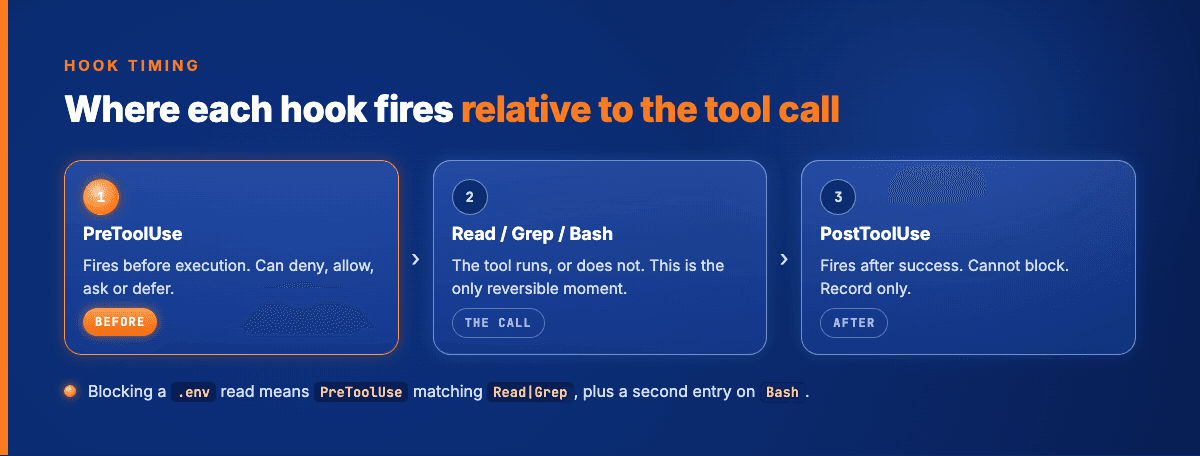
PreToolUse | Before a tool call executes | Yes |
PostToolUse | After a tool call succeeds | No |
PostToolUse cannot block. That is not a limitation you can work around with a clever exit code. The tool has already run, the result is already in the transcript, and the hook is an observer.
So for secrets, the answer is PreToolUse. But the event is only half the configuration. The other half is the matcher, and that is where most setups leak.
The matcher people get wrong
The instinct is to guard Write and Edit. That protects the file from being changed.
That is not the threat. Nobody is worried that the agent will rewrite .env. The worry is that it will read it, put the contents into the context window, and ship them to an inference endpoint that is not yours.
So the tools to match are the ones that get content out of a file:
Read, the direct pathGrep, which returns matching lines. For a.envfile that is the entire value you were protecting
Grep is the one that gets forgotten. A hook that only matches Read looks correct in review and leaks on the first grep -r "API_KEY". The agent was not being sneaky; it was doing exactly what you asked, through a different door.
Matcher syntax is worth knowing precisely here, because it changes evaluation:
- If the string contains only
[a-zA-Z0-9_-, |], it is treated as an exact match or a pipe-separated list.Read|Grepis a list. - If it contains anything else, it is evaluated as an unanchored JavaScript regex.
^Notebookis a regex. So ismcp__memory__.*.
That distinction bites when someone writes Read|Grep|Bash(cat *) and expects the list semantics to keep holding. It will not; the parentheses push it into regex mode and the pattern no longer means what it reads like.
Bash is the hole in every file-access hook
Here is the part that gets left out of most write-ups, and it is the reason my own configuration is longer than three lines.
Blocking Read and Grep stops the two tools whose job is reading files. It does nothing about:
cat .env
head -5 .env.production
env | grep SECRET
python -c "print(open('.env').read())"
All of that is one tool call: Bash. If your hook does not inspect Bash commands, you have guarded the front door and left the side gate open.
The practical shape of a working configuration is two entries against the same event:
PreToolUsematchingRead|Grep, checking the file path against a deny list.PreToolUsematchingBash, checking the command string for the same paths.
The second one is imperfect, because a shell command can be obfuscated in more ways than you can pattern-match. I accept that. The goal is not to defeat an adversary; the agent is not adversarial. The goal is to stop the ordinary case where a model reaches for the fastest route to an answer and the fastest route happens to run through your credentials.
If you want something stronger than pattern-matching, the answer is not a better regex. It is to not have the secret on disk in a path the agent can reach at all.
Exit codes and the JSON contract
Two ways to return a decision, and they do not compose.
Exit codes.Exit 0 means success and your stdout JSON gets processed for decisions. Exit 2 is a blocking error: stderr is fed back to Claude, andstdout is ignored entirely. Any other exit code is non-blocking; the action proceeds and stderr shows up in the transcript.
That middle rule is the one that costs people an afternoon. If you emit a carefully constructed JSON decision object and then exit 2 for good measure, your JSON is discarded. The block still happens, but your reason message comes from stderr instead, and any structure you built is gone.
JSON output. Exit 0 and write to stdout:
{
  "hookSpecificOutput": {
    "hookEventName": "PreToolUse",
    "permissionDecision": "deny",
    "permissionDecisionReason": "Path matches the credential deny list."
  }
}
permissionDecision takes four values: deny, allow, ask, and defer. That last one matters more than it looks. defer means "I have no opinion, run the normal permission flow." allow means "skip the permission prompt entirely."
Using allow where you meant defer is how a hook written to block one thing quietly becomes an auto-approver for everything else it touches. I have done this. The hook worked, the tests passed, and it had silently removed a permission prompt I still wanted.
Rule of thumb: return deny for the cases you are guarding, and defer for everything else. Only return allow when you have genuinely decided that this specific call needs no human in the loop.
Prevent, then observe
PostToolUse is not useless. It is just not a control.
I use it for the thing it is actually good at: writing a record. Every tool call that completes appends a line to a ledger with what ran, what it touched, and what came back. That ledger sits at 23.292 entries and it is the reason I can answer a question about something that happened three weeks ago without guessing.
The split is worth stating plainly, because it is the same split that shows up in every governance conversation I have with clients who have never heard of a hook:
- Prevention is a gate. It runs before, and it can say no.
- Observation is a record. It runs after, and it can only tell you what happened.
You need both. You cannot substitute one for the other. A team that has only observation finds out about problems accurately and late. A team that has only prevention blocks the known cases and learns nothing about the unknown ones.
What I would set up first
If you have no hooks at all, three, in this order.
One: PreToolUse on Read|Grep, denying paths that match .env, .env.*, *.pem, credentials*, and whatever your stack calls its secret files. Fifteen minutes.
Two: PreToolUse on Bash, denying commands whose text contains those same paths. Another fifteen minutes, and it catches the majority of the side-gate cases.
Three: PostToolUse on everything, appending a line to a file. Not for control. So that when something surprising happens, the answer is a lookup instead of a reconstruction.
Everything after that is refinement. SessionStart to inject project context, PreCompact to checkpoint state before the window is squeezed, SubagentStop to catch work that finished outside the main loop. Useful, none of it urgent.
Frequently asked questions
Where this goes next
Hooks are the smallest useful piece of agent governance: a rule that runs whether or not anyone remembers it. The follow-up question is broader, and it is the one that comes up in every conversation once the .env case is handled: what should the agent be allowed to touch at all, and how do you enforce that rather than agree to it.
I write about that in MCP vs CLI: when to replace a server with a command, and the record-keeping side sits in the audit trail I run for AI agents.
If you want the same boundary logic applied to a system you are putting into production rather than a repo you are experimenting in, that is what I do as AI-architect.
The orchestration layer I use is open source. github.com/Vinix24/vnx-orchestration if you want to read the hook configuration rather than take my word for it.
Vincent van Deth
AI Strategy & Architecture
I build production systems with AI — and I've spent the last six months figuring out what it actually takes to run them safely at scale.
My focus is AI Strategy & Architecture: designing multi-agent workflows, building governance infrastructure, and helping organisations move from AI experiments to auditable, production-grade systems. I'm the creator of VNX, an open-source governance layer for multi-agent AI that enforces human approval gates, append-only audit trails, and evidence-based task closure.
Based in the Netherlands. I write about what I build — including the failures.