OnCue schrijft je gesprek uit. Op je eigen computer.
OnCue is een notulist en een gesprekscoach die op je eigen computer draaien. Het luistert mee met je gesprek in Teams, Zoom of Meet en zet het om in tekst. Na afloop staat het hele gesprek in een bestand bij jou.
Er schuift geen bot aan. Standaard gaat er geen gesprekstekst of geluid naar buiten.
Werkt via het geluid van je eigen computer
Notulist of gesprekscoach. Je kiest per gesprek.
Het is één installatie met twee standen.
Notulist
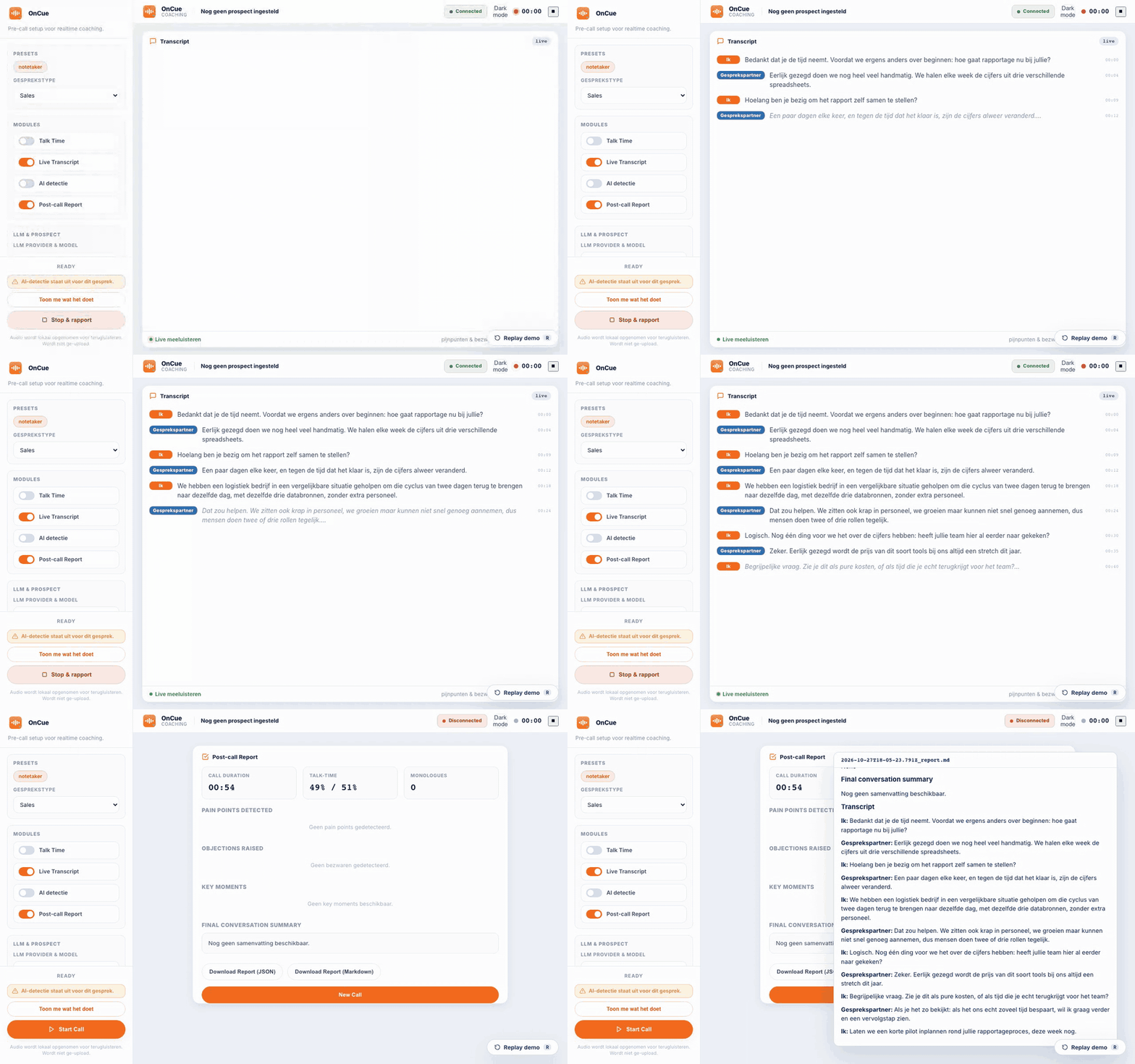
Schrijft beide kanten van het gesprek uit, live terwijl je praat. Na afloop staat het hele gesprek als tekstbestand op je computer, klaar om te lezen of door te sturen. Geen coaching, geen meldingen. Voor een intake, een interview, een overleg of een klantgesprek.
Gesprekscoach
Laat in het dashboard zien hoe de spreektijd verdeeld is. Wie te lang achter elkaar praat, krijgt een seintje. Pijnpunten, bezwaren en koopsignalen verschijnen zodra je gesprekspartner ze uitspreekt. Ook die herkenning draait op je eigen computer.
Voor geen van beide is een taalmodel nodig. Een taalmodel maakt er alleen een samenvatting met actiepunten bij. Of je dat wilt en waar dat gebeurt, kies je zelf.
Standaard verlaat je gesprek je computer niet.
Zo staat OnCue ingesteld als je het installeert en niets verandert:
- Het uitschrijven gebeurt op je eigen computer, met het open spraakmodel Whisper.
- Er is geen taalmodel ingesteld. Er gaat geen gesprekstekst naar buiten.
- Het geluid zelf wordt niet bewaard. Dat zet je alleen aan als je een opname wilt terugluisteren.
- Zonder licentiesleutel maakt de open source versie geen contact met mij als maker.
Wanneer er wel iets naar buiten gaat
Wil je een samenvatting? Dan kies je per gesprek waar het taalmodel draait:
Op je eigen computer.
Bijvoorbeeld met Ollama. De tekst blijft daar.
In de cloudomgeving van je eigen organisatie.
Azure OpenAI of Vertex AI, binnen een contract en een regio die je al hebt. Er komt geen nieuwe verwerker bij.
Bij een openbare dienst, met je eigen sleutel.
Gemini, OpenAI, Groq of OpenRouter. Dan gaat het transcript naar die dienst. Er gaat eerst een filter overheen die e-mailadressen, telefoonnummers en een deel van de namen weghaalt. Dat filter is een vangnet, geen garantie.
Twee instellingen sturen het geluid zelf van je computer af. De ene laat een clouddienst het uitschrijven doen. De andere zet de transcriptieserver open voor andere computers in je netwerk. Beide staan standaard uit. Per klant kun je een plafond zetten. Dan weigert OnCue een route die boven dat plafond uitkomt al bij de start van het gesprek.
OnCue schuift niet aan. Het luistert via je eigen computer.
De meeste notetakers sturen een bot naar je vergadering. OnCue pakt het geluid van je eigen computer: je microfoon en wat je via je speakers of koptelefoon hoort. Daardoor maakt het niet uit of het gesprek in Teams, Zoom, Meet, Webex of via een telefoonbrug op je computer loopt.
Je gesprekspartners zien geen extra deelnemer. Vertel ze dus zelf dat je het gesprek laat uitschrijven. Onder de AVG ben jij daarvoor verantwoordelijk, ook als alles lokaal blijft.
Namen zijn de zwakke plek. De rest is goed genoeg voor notulen.
Ik heb mijn eigen opnames op twee manieren laten uitschrijven: live tijdens het gesprek en achteraf. Op 45 namen en vaktermen stonden er live 27 goed en achteraf 28. Twee keer dezelfde opname met dezelfde instellingen verschilt al ongeveer drie. Live is dus net zo goed als achteraf.
Een lijst met de namen van dat gesprek vooraf meegeven, had geen meetbaar effect. Lees de namen na voordat je het verslag deelt.
Waar OnCue ophoudt
Sprekers per persoon scheiden kan alleen achteraf.
Standaard splitst OnCue op geluidsbron: in het verslag staan "Ik" en "Gesprekspartner". In een overleg met vier mensen heten de andere drie samen "Gesprekspartner". Per persoon scheiden doe je achteraf met een script op een opname. Het script geeft elke stem die het onderscheidt een eigen label (SPEAKER_00, SPEAKER_01). In een groep is dat niet waterdicht. Op drie groepsopnames met zes à zeven sprekers vond het er vijf of zes, dus stemmen die op elkaar lijken kunnen onder één label vallen. Het draait op je eigen computer. Je hebt eenmalig een Hugging Face-token nodig om het model te downloaden. Namen koppelen doet OnCue niet.
Gesprekken via je computer.
Een gesprek aan tafel zonder computer ertussen is niet waarvoor het gebouwd is.
Op Windows werkt een headset het best.
OnCue pakt op Windows het hele geluid van je computer. Met speakers neemt het ook je eigen echo mee.
Toestemming blijft jouw taak.
OnCue helpt je niet met het informeren van je gesprekspartners.
Zo probeer je het op een Mac
Je hebt een Mac nodig met macOS 13 of nieuwer en Homebrew. Je plakt zes regels in het programma Terminal:
xcode-select --install
brew install cmake
git clone https://github.com/Vinix24/OnCue.git
cd OnCue
bash scripts/install.sh
.venv/bin/sales-copilot start
Daarna:
Ga in je browser naar http://localhost:8760/dashboard. Dat is OnCue op je eigen computer, geen website.
Klik links onder Presets op notetaker.
Klik op Start Call als het gesprek begint en op Stop & rapport als het klaar is.
Het hele gesprek staat daarna als tekstbestand in de map data/reports binnen de OnCue-map.
De stappen staan ook in het Nederlands bovenaan de README op GitHub.
Zo probeer je het op Windows
Je hebt Windows 10 (versie 2004 of nieuwer) of Windows 11 nodig, Python 3.11 tot en met 3.14 in de 64-bits versie en een headset. Ontbreekt Python, dan toont de installatie het winget-commando om het te installeren. Open een gewoon PowerShell-venster (niet als beheerder) in de OnCue-map en voer één commando uit:
powershell -NoProfile -ExecutionPolicy Bypass -File scripts\install.ps1De installatie maakt een eigen Python-omgeving, haalt whisper.cpp en het uitschrijfmodel binnen en maakt een .env aan zonder taalmodel.
Aan het eind toont de installatie de regel waarmee je OnCue start. Daarna staat het dashboard op http://localhost:8760/dashboard.
Verwijderen doe je met hetzelfde commando plus -Uninstall:
powershell -NoProfile -ExecutionPolicy Bypass -File scripts\install.ps1 -UninstallGebouwd voor verkoopgesprekken, bruikbaar voor elk gesprek
OnCue begon als gesprekscoach voor verkopers. De notulist werkt voor elk gesprek dat via je computer loopt:
een intake of kennismaking
een sollicitatie- of klantinterview
een coachgesprek
een intern overleg
Hoe gevoeliger het gesprek, hoe meer het uitmaakt dat het je computer niet verlaat.
Doe mee aan de pilot
Ik zoek 25 mensen die OnCue in hun eigen gesprekken gebruiken en me vertellen waar het schuurt. Tijdens de pilot is het gratis. Je krijgt een pilot-sleutel en ik hoor graag wat je mist.
Bij een volle pilot zet je je op de wachtlijst. Ik neem contact op zodra er een plek vrijkomt.
Meld je aan voor early access
De open source versie staat los hiervan gewoon op GitHub en is compleet en gratis. Voor teams bestaan er betaalde uitbreidingen.